Keep EUDAMED, UDI, certificates, SS(C)P and controlled records aligned when products change.
You changed something about a device. ClinicOps checks whether that change reached every regulatory record in the agreed scope where it should appear — and shows your team exactly what still needs review.
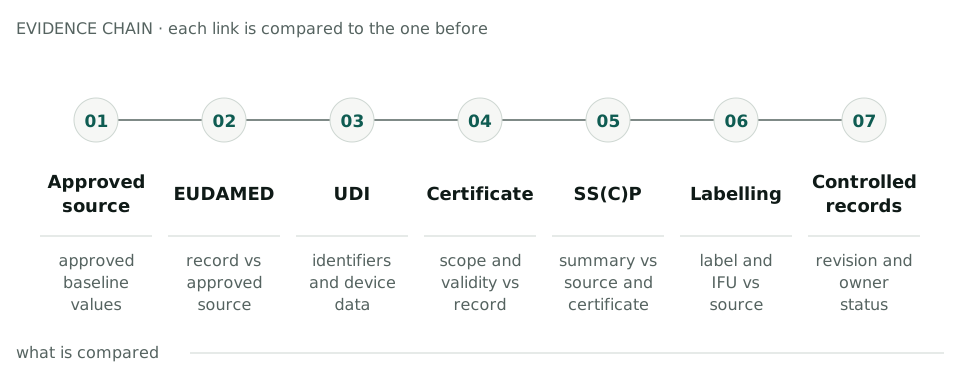
Here's what that looks like in practice: an IFU gets revised to rev 12, the label follows, the Declaration of Conformity follows — and somewhere in the chain, the EUDAMED export still says rev 11. Nobody decided that; it just wasn't run again. That's the ordinary way records drift: one approved fact, five or six places it has to match, no single moment where anyone checks they still agree. Bring the exports and controlled documents you already have; ClinicOps compares them deterministically and returns an exception queue with an owner and closure evidence per row. Nothing to implement, nothing to migrate. Machines compare; your qualified team decides.
No single change yet? Start from a portfolio export →
Runs in your browser. No upload. No sign-up. Nothing you enter leaves the page.
Why records drift
One approved fact — a device name, a UDI-DI, an intended-purpose statement, a certificate reference, an SS(C)P revision — can appear in EUDAMED, UDI records, labels, IFUs, declarations, technical documentation, RIM/master data and controlled spreadsheets at once. Those copies are maintained by different owners in different systems, and after every change some of them quietly drift apart. Finding the drift by hand is slow; missing it is worse.
How ClinicOps works
Deterministic comparison, a fixed set of statuses (aligned, mismatch signal, missing evidence, conflicting evidence, unresolved, requires qualified review), a named owner per exception and a closure record at the end. No scores, no automated regulatory conclusions.
Behind ClinicOps: MSc in Medicine (Translational Medicine), Aalborg University · hands-on pharmacovigilance · Pharma + MedTech documentation experience · native Danish · the experience behind ClinicOps →
One workflow, three ways in
It's one review, met at whatever point of readiness you're at — not three separate products.
Regulatory Change Integrity Review
Already know what changed and want it checked properly? This is the full review: one bounded evidence population, one reviewer-ready closure packet — source register, change-surface matrix, exception queue, owner routing and closure evidence. Every other entry point leads here.
Regulatory Integrity Scanner
Want to see how the comparison actually works before handing anything over? The same logic runs as a browser-local tool: check a single change or import a device/UDI export for a portfolio scan. Deterministic, exportable, nothing uploaded.
Portfolio scans & monitoring
No single change on the table yet? Start from a portfolio export instead. If changes keep coming, monitoring extends a completed review — offered only once that review has shown drift actually recurs.
What the output looks like
What you receive
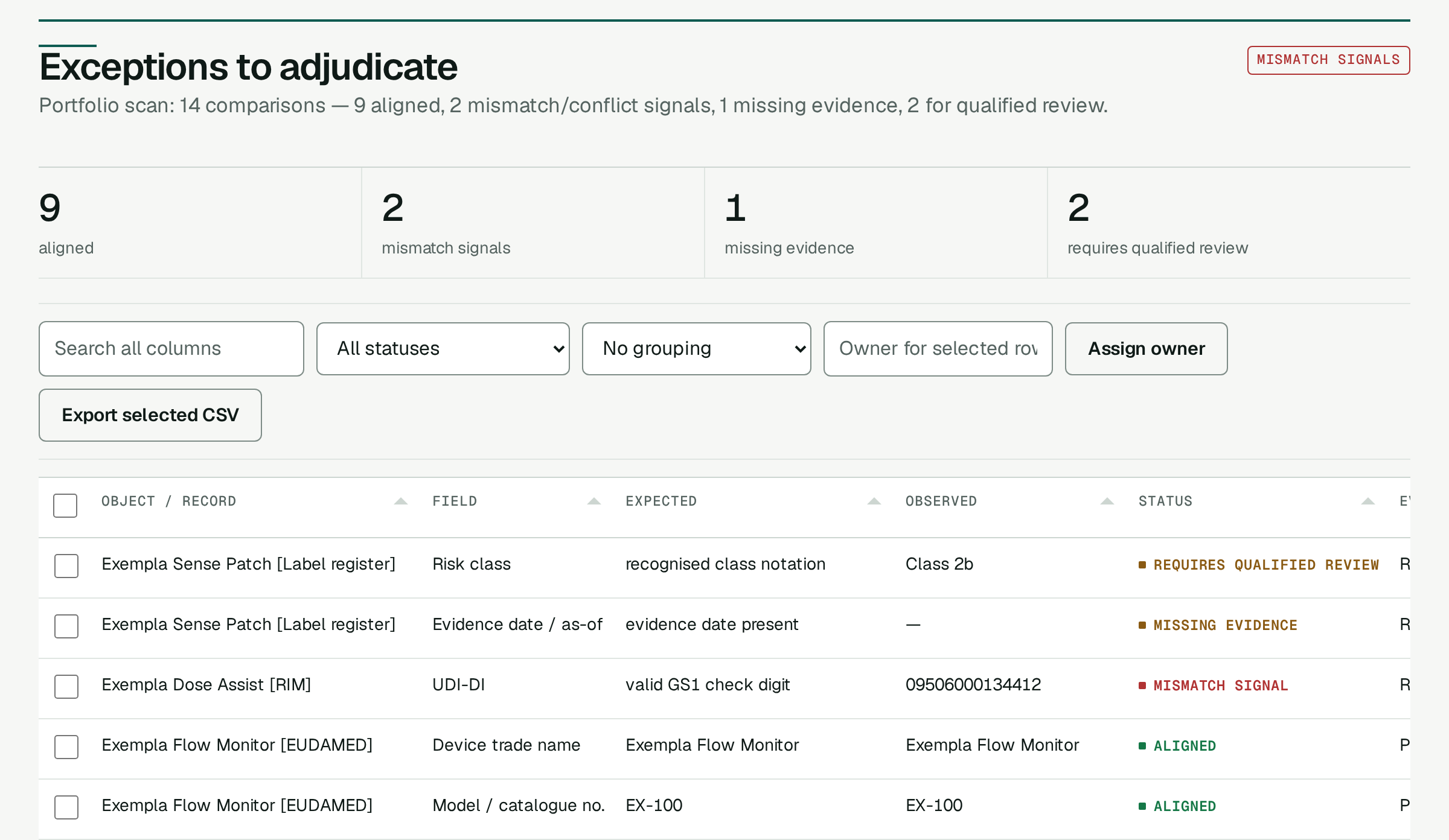
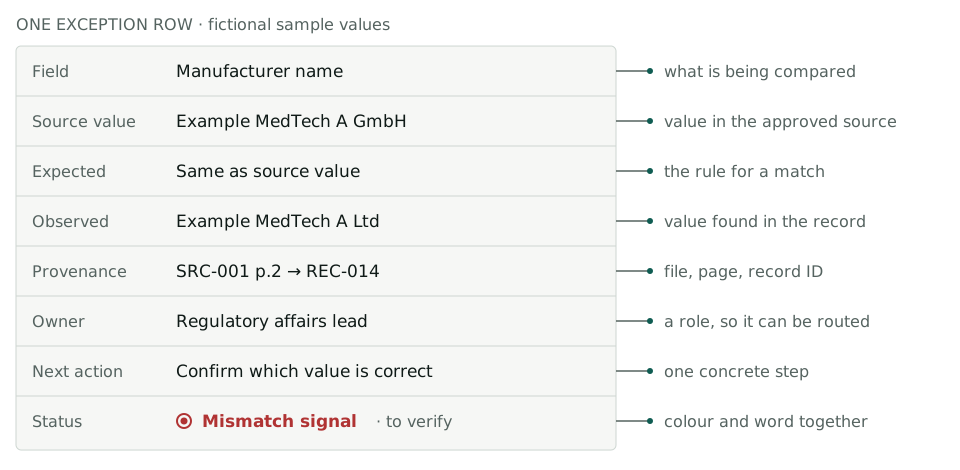
An exception queue, not a score. Each row contains:
Source, expected, observed
The approved source value, the value expected on each declared surface, and the value observed in the evidence provided.
Evidence provenance
Every observation links to the document, export or record it came from, so a reviewer can check it without re-searching.
Owner and next action
A named owner and a next action for every exception.
Status and closure
One of the fixed statuses above, and the closure evidence recorded when the exception is closed.
Coverage
EU authorised representation: Ali Iskandar is registered as an EUDAMED AR actor in Spain (SRN ES-AR-000060462). Manufacturer/device representation requires a separate accepted written mandate. Explore EU AR scoping →
See how each surface is handled in the use cases.
Boundaries
Specialist context when needed. Where an exception needs clinical context, ClinicOps can bring in independent specialist review — medicine and nursing — and record it in the evidence trail. How specialist review works →
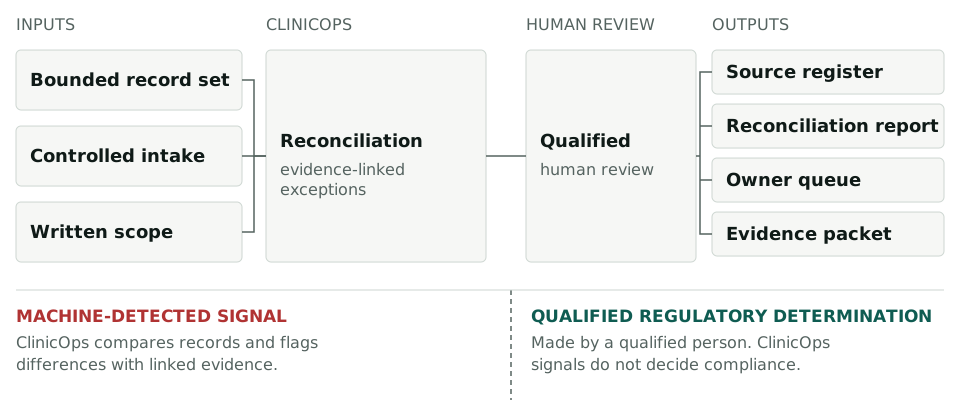
How a review runs
Scope
Agree one approved change or one portfolio export, the surfaces to compare and a named regulatory owner.
Controlled intake
You provide the exports and controlled records inside that scope. Only the declared evidence population is compared.
Work product
ClinicOps runs the deterministic comparison and assembles the source register, change-surface matrix and exception queue.
Qualified human review
Your qualified owners dispose of each exception. Specialist review is brought in only where an exception needs it.
Delivery
A closure packet: a readable report and a machine-readable export, with closure evidence per exception.
Inspect the method before you engage
Interactive specimen register
Inspect a synthetic row-by-row evidence chain and the reviewer boundary.
Research & methodology
Public-source research on EUDAMED data quality, SS(C)P records and reconciliation method.
Bring one real change.
The fastest way to evaluate ClinicOps is a bounded pilot: one product family or one approved change, a declared evidence population, a fixed window and a named owner.